
Release Ease: DevEx Survey Questions to Help Teams Release Code Without Delay or Stress

In our DevEx AI tool, we use two sets of survey questions: DevEx Pulse (one question per area to track overall delivery performance) and DevEx Deep Dive (a focused root-cause diagnostic when something needs attention).
DevEx Pulse tells us where friction is. DevEx Deep Dive tells us why it exists.
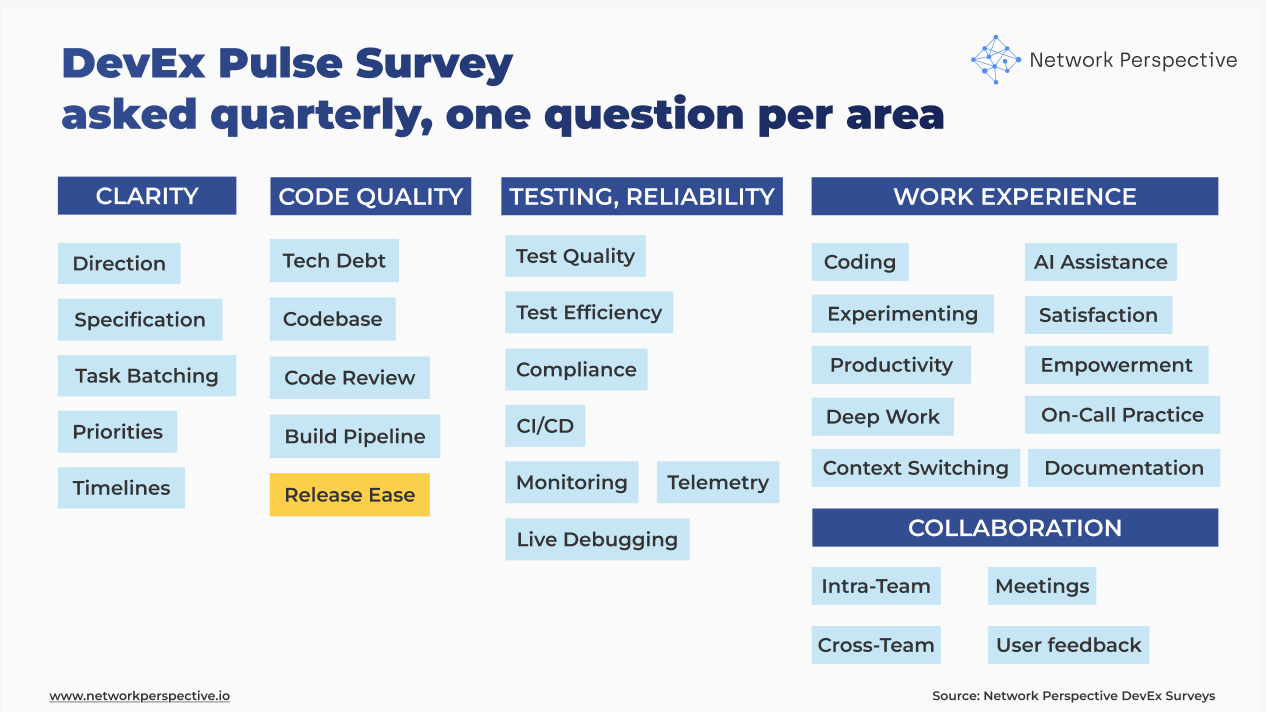
Let’s take a closer look at release ease. If the Pulse question “Deploying and releasing code to end-users is quick and simple” receives low scores and developers’ comments reveal significant friction and blockers, what should you do next?
Here are 13 deep dive questions you can ask your developers to uncover the causes of friction in release ease, along with guidance on how to interpret the results, common patterns engineering teams encounter, and practical first steps for improvement. This will help you pinpoint what’s causing the problem and fix it on your own, or move faster with our DevEx AI tool and expert guidance.
Release Ease — DevEx Survey Questions for Engineering Teams
The real question is: Can code be released easily and safely, without stress or delay?
Deep dive questions should help you map how release flows through your delivery process and identify where it breaks down:
Simplicity → Speed → Automation → Approval Flow → Safety → Control → Cost
Here’s how the DevEx AI tool helps uncover this.
Steps
Is releasing simple and clear?
- Few / Releasing code usually takes only a few clear steps.
- Clear / It’s clear what needs to be done to release code.
Speed
Does releasing move quickly and predictably?
- Fast / Releases usually finish quickly.
- ETA / It’s usually clear how long a release will take.
Manual work
How much hand work is needed?
- Automated / Most release steps happen automatically.
- Manual / Releasing doesn’t require many manual steps.
Approvals
Do people slow releases down?
- Known / It’s clear when approval is needed to release.
- Quick / Approvals usually don’t slow releases down.
Safety
Does releasing feel safe and reversible?
- Safe / Releasing code usually feels safe.
- Undo / It’s easy to roll back a release if something goes wrong.
Control
Can teams release when ready, with clear ownership?
- Anytime / Code can usually be released as soon as it’s ready.
- Owner / It’s clear who is responsible for releasing code.
Effort
Weekly / Thinking about preparing releases, waiting for approvals, doing manual steps, fixing release issues, or rolling back changes — about how much time is spent in a typical week dealing with this?
- None
- Less than 1 hour
- 1–2 hours
- 3–5 hours
- 6–10 hours
- More than 10 hours
Open-ended question (comments)
What’s missing or not working well for you here?
How to Analyze DevEx Survey Results on Release Ease?
Do releases move quickly and safely — or get slowed down by steps, approvals, and manual work? Here’s how the DevEx AI tool helps make sense of the results.
How to Read Each Section
Steps
Questions
- Few – Releasing code usually takes only a few clear steps
- Clear – It’s clear what needs to be done to release code
What this section tests
Whether releasing is simple and understandable, or complex and confusing.
How to read scores
- Few ↓, Clear ↓
→ Releasing feels complicated and unclear. - Few ↑, Clear ↓
→ Steps are short, but not well explained. - Few ↓, Clear ↑
→ Steps are known, but there are too many of them.
Key insight
Too many or unclear steps turn releasing into a careful, slow activity.
Open-ended comments - how to read responses
- “So many steps” → complexity
- “Hard to remember how” → unclear steps
- “Checklist needed every time” → fragile process
Key insight
Simplicity matters more than documentation.
Speed
Questions
- Fast – Releases usually finish quickly
- ETA – It’s usually clear how long a release will take
What this section tests
Whether releases are fast and predictable, or slow and hard to plan around.
How to read scores
- Fast ↓, ETA ↓
→ Releases are slow and unpredictable. - Fast ↑, ETA ↓
→ Releases are sometimes quick, but timing is unclear. - Fast ↓, ETA ↑
→ Releases are known to be slow, and teams plan around it.
Key insight
Slow or unpredictable releases delay value reaching users.
Open-ended comments - how to read responses
- “Takes a while” → slow releases
- “No idea how long it’ll take” → poor predictability
- “Waiting around” → idle time
Key insight
Waiting during releases is lost delivery time.
Manual work
Questions
- Automated – Most release steps happen automatically
- Manual – Releasing doesn’t require many manual steps
What this section tests
How much hands-on work is needed to release code.
How to read scores
- Automated ↓, Manual ↓
→ Releases rely heavily on manual work. - Automated ↑, Manual ↓
→ Automation exists, but gaps remain. - Automated ↓, Manual ↑
→ Manual work is expected and normalized.
Key insight
Manual release steps increase time, errors, and stress.
Open-ended comments - how to read responses
- “Run scripts by hand” → manual work
- “Copy-paste steps” → fragile automation
- “Easy to miss something” → error risk
Key insight
Manual work doesn’t scale and doesn’t feel safe.
Approvals
Questions
- Known – It’s clear when approval is needed to release
- Quick – Approvals usually don’t slow releases down
What this section tests
Whether releases are blocked by people, not code.
How to read scores
- Known ↓, Quick ↓
→ Approval rules are unclear and slow. - Known ↑, Quick ↓
→ Approvals are clear but cause delays. - Known ↓, Quick ↑
→ Approvals happen quickly, but rules are fuzzy.
Key insight
People-based gates often become the slowest part of releasing.
Open-ended comments - how to read responses
- “Waiting for sign-off” → approval delays
- “Not sure who approves” → unclear rules
- “Depends who’s online” → availability issue
Key insight
Approval delays are system design problems, not people problems.
Safety
Questions
- Safe – Releasing code usually feels safe
- Undo – It’s easy to roll back a release if something goes wrong
What this section tests
Whether releasing feels low risk or scary.
How to read scores
- Safe ↓, Undo ↓
→ Releasing feels dangerous. - Safe ↑, Undo ↓
→ Teams feel okay releasing, but fear rollback. - Safe ↓, Undo ↑
→ Rollback exists, but trust is low.
Key insight
Fear of release slows delivery more than actual failures.
Open-ended comments - how to read responses
- “Hope nothing breaks” → fear
- “Rollback is painful” → poor recovery
- “Extra checks before release” → low trust
Key insight
Safety is about fast recovery, not perfect releases.
Control
Questions
- Anytime – Code can usually be released as soon as it’s ready
- Owner – It’s clear who is responsible for releasing code
What this section tests
Whether teams have control over when and how they release.
How to read scores
- Anytime ↓, Owner ↓
→ Releases are tightly controlled and gated. - Anytime ↑, Owner ↓
→ Releases are flexible, but responsibility is unclear. - Anytime ↓, Owner ↑
→ Ownership exists, but release windows limit flexibility.
Key insight
When teams can’t release on their own terms, work piles up.
Open-ended comments - how to read responses
- “Release windows” → batching
- “Only one person can release” → bottleneck
- “Not sure who handles releases” → ownership gap
Key insight
Control over releases directly affects delivery speed.
Effort
Question
- Weekly – Time spent preparing releases, waiting for approvals, doing manual steps, fixing issues, or rolling back changes
How to read responses
- 0–1 hr/week → Healthy release flow
- 1–3 hrs/week → Some friction
- 3–5 hrs/week → Systemic drag
- 6+ hrs/week → Must-fix release problem
Key insight
Time spent dealing with releases is the clearest cost signal.
Pattern Reading (Across Sections)
Pattern — “Manual Release” (Very common)
Pattern: Automation ↓ + Effort ↑
Interpretation: Releases rely on manual steps, increasing time, errors, and stress.
Pattern — “Approval Bottleneck” (Very common)
Pattern: Approvals ↓ + Speed ↓
Interpretation: Releases are delayed by people-based gates rather than system checks.
Pattern — “Slow Release Flow” (Common)
Pattern: Speed ↓ + Effort ↑
Interpretation: Releases take too long and consume significant engineering time.
Pattern — “Complex Process” (Common)
Pattern: Steps ↓ + Effort ↑
Interpretation: Too many or unclear steps make releases slow and error-prone.
Pattern — “Fearful Release” (Common)
Pattern: Safety ↓ + Effort ↑
Interpretation: Teams don’t trust the release process, leading to extra checks and hesitation.
Pattern — “No Release Control” (Medium)
Pattern: Control ↓ + Approvals ↓
Interpretation: Teams cannot release independently and depend on external coordination.
Pattern — “Automation Without Impact” (Medium)
Pattern: Automation ↑ + Effort ↑
Interpretation: Automation exists, but doesn’t reduce real work (partial or fragile automation).
Pattern — “Looks Fine, Feels Slow” (Common)
Pattern: All scores ↑ + Effort ↑
Interpretation: The process appears healthy, but hidden friction still consumes time.
One key meta-insight
Release problems rarely come from one issue — they come from the interaction between steps, approvals, automation, and safety.
How to Read Contradictions (This Is Where Insight Is)
Contradiction Fast ↑, Effort ↑
→ Releases are quick, but preparation, waiting, or fixing issues still takes significant time.
Contradiction Automated ↑, Effort ↑
→ Automation exists, but doesn’t reduce real work (partial, fragile, or followed by manual fixes).
Contradiction Safe ↑, Speed ↓
→ Releases feel safe, but extra checks and caution slow everything down.
Contradiction Anytime ↑, Approvals ↓
→ Teams can release in theory, but still depend on people or coordination in practice.
Contradiction Clear ↑, Few ↓
→ Steps are understood, but there are too many of them.
Contradiction Few ↑, Clear ↓
→ The process is short, but unclear or confusing.
Contradiction Undo ↑, Safe ↓
→ Rollback exists, but teams still don’t trust the release process.
Contradiction Known ↑, Quick ↓
→ Approval rules are clear, but still slow things down.
Contradiction All scores ↑, Effort ↑
→ The release process looks healthy, but hidden friction still consumes time.
Contradictions show where the release system appears efficient, but still creates delay, effort, or risk in practice.
Final Guidance — How to Present Results
What NOT to say
- “Releases are too slow”
- “Teams need to automate more”
- “People are blocking releases”
- “Engineers should follow the process better”
What TO say (use this framing)
“This shows where our release process slows down delivery.”
“The issue isn’t people — it’s steps, approvals, and manual work.”
“We’re losing most time in [X], not in releasing overall.”
“Fixing this part of the release flow will reduce delay and effort.”
One Powerful Way to Present Results
Show three things only:
- How long releases take → Speed + predictability (Fast, ETA)
- What slows releases down → Steps, approvals, manual work (Simplicity, Automation, Approval Flow)
- How much time is lost every week → Release Time Lost (Effort)
Using DevEx Test Quality Insights to Improve How Teams Release Code Without Delay or Stress
Here’s how the DevEx AI tool will guide you toward making first actions.
First Steps Per Section
Steps
Problem signal: Too many or unclear steps
First steps
- Write down the actual release steps (not docs — reality)
- Remove or merge unnecessary steps
- Create a single, visible release checklist or command
Goal: make release understandable without memory
Speed
Problem signal: Slow or unpredictable releases
First steps
- Measure actual release duration (start → done)
- Identify longest waiting step
- Set a target release time (e.g. <15 min)
Goal: make release time visible and predictable
Manual Work
Problem signal: Too many manual actions
First steps
- List all manual steps
- Automate the top 1–2 repeated actions
- Replace scripts with one command / pipeline
Goal: reduce human involvement
Approvals
Problem signal: Waiting on people
First steps
- Define when approval is actually needed
- Remove approvals for low-risk changes
- Introduce auto-approval rules (tests pass, no risky changes)
Goal: remove unnecessary human gates
Safety
Problem signal: Fear of releasing
First steps
- Ensure rollback works in <5 minutes
- Test rollback regularly
- Add small release strategy (feature flags, gradual rollout)
Goal: make failure cheap and safe
Control
Problem signal: Teams can’t release freely
First steps
- Ensure team can release without external dependency
- Define clear release ownership
- Remove “only X can release” bottlenecks
Goal: give teams control over delivery
Effort (Release Time Lost)
Problem signal: High weekly time cost
First steps
- Break down time into:
- waiting
- manual work
- fixing issues
- Target the largest time sink first
Goal: remove the biggest time loss, not everything
First Steps for Patterns
Pattern — “Manual Release” (Very common)
Manual ↓ + Effort ↑
First step
- Automate the most frequent manual step
- Introduce one-click release
Pattern — “Approval Bottleneck”
Approvals ↓ + Speed ↓
First step
- Reduce approvals to exception cases only
- Move checks to automated validation
Pattern — “Slow Pipeline”
Speed ↓ + Manual ↓
First step
- Optimize pipeline stages
- Parallelize steps
- Remove unnecessary checks
Pattern — “Fearful Releases”
Safety ↓ + Effort ↑
First step
- Invest in fast rollback
- Introduce progressive delivery
Pattern — “No Release Control”
Control ↓ + Effort ↑
First step
- Decouple release ownership
- Remove central gatekeepers
First Steps for Contradictions
Contradictions highlight hidden system problems.
Contradiction Fast ↑, Effort ↑
Releases are quick, but preparation or fixes are heavy
First step: break down effort:
- before (prep)
- during
- after (fixes)
Contradiction Automated ↑, Effort ↑
Automation exists, but doesn’t reduce work
First step: check:
- partial automation
- brittle scripts
- manual fixes after automation
Contradiction Safe ↑, Slow ↓
Releases feel safe but are slow
First step:
- Reduce over-checking
- shift safety to rollback + monitoring
Contradiction Anytime ↑, Approvals ↓
Teams can release, but still wait
First step: hidden approvals or dependencies exist → remove them
The Core Improvement Rule
Optimize for frequent, low-risk releases — not perfect releases.
Most release problems come from: batching too much, adding too many checks, relying on people instead of systems
The Most Powerful First Step Overall
Make release a one-click, observable process.
One command
→ automated pipeline
→ clear status
→ easy rollback
Why this works: (1) removes complexity, (2) exposes bottlenecks, (3) reduces cognitive load, and (4) builds trust in the system
If releasing feels like an event, your system is working against you.
If releasing feels routine, your system is working for you.
There’s Much More to DevEx Than Metrics
What you’ve seen here is only a small part of what the DevEx AI platform can do to improve delivery speed, quality, and ease.
If your organization struggles with fragmented metrics, unclear signals across teams, or the frustrating feeling of seeing problems without knowing what to fix, DevEx AI may be exactly what you need. Many engineering organizations operate with disconnected dashboards, conflicting interpretations of performance, and weak feedback loops — which leads to effort spent in the wrong places while real bottlenecks remain untouched.
DevEx AI brings these scattered signals into one coherent view of delivery. It focuses on the inputs that shape performance — how teams work, where friction accumulates, and what slows or accelerates progress — and translates them into clear priorities for action. You gain comparable insights across teams and tech stacks, root-cause visibility grounded in real developer experience, and guidance on where improvement efforts will have the highest impact.
At its core, DevEx AI combines targeted developer surveys with behavioral data to expose hidden friction in the delivery process. AI transforms developers’ free-text comments — often a goldmine of operational truth — into structured insights: recurring problems, root causes, and concrete actions tailored to your environment.
The platform detects patterns across teams, benchmarks results internally and against comparable organizations, and provides context-aware recommendations rather than generic best practices.
Progress on these input factors is tracked over time, enabling teams to verify that changes in ways of working are actually taking hold, while leaders maintain visibility without micromanagement. Expert guidance supports interpretation, prioritization, and the translation of insights into measurable improvements.
To understand whether these changes truly improve delivery outcomes, DevEx AI also measures DORA metrics — Deployment Frequency, Lead Time for Changes, Change Failure Rate, and Mean Time to Recovery — derived directly from repository and delivery data. These output indicators show how software performs in production and whether improvements to developer experience translate into faster, safer releases.
By combining input metrics (how work happens) with output metrics (what results are achieved), the platform creates a closed feedback loop that connects actions to outcomes, helping organizations learn what actually drives better delivery and where further improvement is needed.
Returning to our topic — release ease — you can explore proven practices grounded in hundreds of interviews our team has conducted with engineering leaders.

