
Test Quality: DevEx Survey Questions to Help Teams Catch Bugs Before Production

In our DevEx AI tool, we use two sets of survey questions: DevEx Pulse (one question per area to track overall delivery performance) and DevEx Deep Dive (a focused root-cause diagnostic when something needs attention).
DevEx Pulse tells us where friction is. DevEx Deep Dive tells us why it exists.
Let’s take a closer look at test quality. If the Pulse question “Our tests catch the vast majority of issues before production” receives low scores and developers’ comments reveal significant friction and blockers, what should you do next?
Here are 14 deep dive questions you can ask your developers to uncover the causes of friction in test quality, along with guidance on how to interpret the results, common patterns engineering teams encounter, and practical first steps for improvement. This will help you pinpoint what’s causing the problem and fix it on your own, or move faster with our DevEx AI tool and expert guidance.
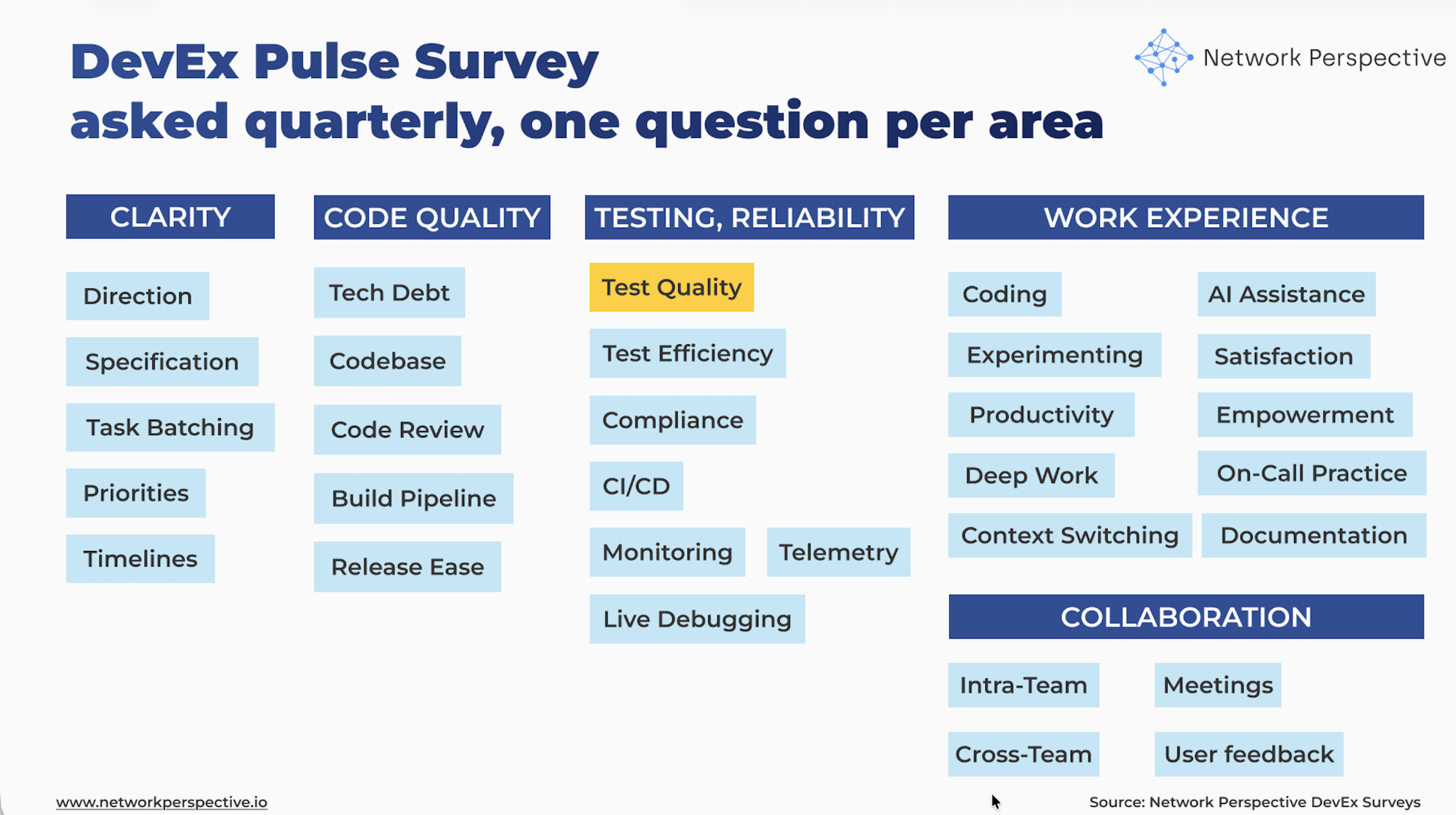
Test Quality — DevEx Survey Questions for Engineering Teams
The real question is: Do tests catch real problems early — or do issues still slip into production?
Deep dive questions should help you map how test quality flows through your delivery process and identify where it breaks down:
Coverage → Bug Prevention → Confidence → Realism → Failure Clarity → Test Care → Cost
Here’s how the DevEx AI tool helps uncover this.
Coverage
Do tests cover what matters?
- Key paths / Tests cover the main user paths and important flows.
- Edge cases / Tests cover common edge cases and failure scenarios.
Bugs
Do tests catch real problems?
- Before prod / Most bugs are caught by tests before release.
- Not after / The same kinds of bugs don’t keep showing up in production.
Confidence
Do tests give real confidence?
- Trust / Passing tests usually mean the code is safe to ship.
- No surprises / Test results usually match what happens in production.
Relevance
Do tests focus on the right things?
- Real use / Tests reflect how the system is actually used.
- Key checks / Tests focus on important behavior, not just setup or mocks.
Failures
Are test failures useful?
- Clear fail / When a test fails, it’s clear what broke.
- Actionable / It’s usually clear what needs to be fixed when tests fail.
Care
Are tests kept healthy over time?
- Updated / Tests are kept up to date as the code changes.
- Owned / It’s clear who owns and fixes broken tests.
Effort
- Weekly / Thinking about fixing tests, investigating failures, adding missing tests, or dealing with bugs that tests didn’t catch — about how much time is spent in a typical week dealing with this?
- None
- Less than 1 hour
- 1–2 hours
- 3–5 hours
- 6–10 hours
- More than 10 hours
Open-ended question (comments)
What’s missing or not working well for you here?
How to Analyze DevEx Survey Results on Test Quality?
Do tests catch real problems early — or do issues still slip into production? Here’s how the DevEx AI tool helps make sense of the results.
How to Read Each Section
Coverage
Questions
- Key paths – Tests cover the main user paths and important flows
- Edge cases – Tests cover common edge cases and failure scenarios
What this section tests
Whether tests cover what users actually do, not just happy paths.
How to read scores
- Key paths ↓, Edge cases ↓
→ Tests miss important behavior. - Key paths ↑, Edge cases ↓
→ Main flows are covered, but failures slip through. - Key paths ↓, Edge cases ↑
→ Edge cases are tested, but core flows aren’t.
Key insight
Tests that miss key paths give a false sense of safety.
Open-ended comments - how to read responses
- “Only happy paths” → missing coverage
- “Didn’t expect that case” → edge gaps
- Specific missed scenarios → strong signal
Key insight
Coverage gaps explain why bugs feel “surprising”.
Bugs
Questions
- Before prod – Most bugs are caught by tests before release
- Not after – The same kinds of bugs don’t keep showing up in production
What this section tests
Whether tests actually stop bugs, not just exist.
How to read scores
- Before prod ↓, Not after ↓
→ Tests are failing at their main job. - Before prod ↑, Not after ↓
→ Tests catch some issues, but patterns repeat. - Before prod ↓, Not after ↑
→ Bugs are fixed later, not prevented.
Key insight
Repeated bugs mean tests aren’t learning from failures.
Open-ended comments - how to read responses
- “Same issue again” → missing regression tests
- “Caught in prod” → test gaps
- “We knew this could happen” → known risk not covered
Key insight
Tests should prevent repeat problems, not just document them.
Confidence
Questions
- Trust – Passing tests usually mean the code is safe to ship
- No surprises – Test results usually match what happens in production
What this section tests
Whether teams trust test results.
How to read scores
- Trust ↓, No surprises ↓
→ Tests are not believed. - Trust ↑, No surprises ↓
→ Tests feel good, but prod behaves differently. - Trust ↓, No surprises ↑
→ Teams rely on other signals instead of tests.
Key insight
Tests only help if people believe them.
Open-ended comments - how to read responses
- “Green doesn’t mean safe” → low trust
- “Prod is different” → environment gap
- “Extra checks before release” → test distrust
Key insight
Low trust turns tests into noise.
Relevance
Questions
- Real use – Tests reflect how the system is actually used
- Important checks – Tests focus on important behavior, not just setup or mocks
What this section tests
Whether tests match real-world use, not internal details.
How to read scores
- Real use ↓, Important checks ↓
→ Tests don’t reflect reality. - Real use ↑, Important checks ↓
→ Tests follow flows, but miss key behavior. - Real use ↓, Important checks ↑
→ Tests check logic, but not usage.
Key insight
Tests that don’t match real use miss real bugs.
Open-ended comments - how to read responses
- “Mocks don’t match prod” → unrealistic tests
- “Covers internals only” → wrong focus
- “Users do this differently” → relevance gap
Key insight
Real usage should drive test design.
Failures
Questions
- Clear fail – When a test fails, it’s clear what broke
- Actionable – It’s usually clear what needs to be fixed
What this section tests
How easy it is to act on test failures.
How to read scores
- Clear fail ↓, Actionable ↓
→ Failures cause long investigations. - Clear fail ↑, Actionable ↓
→ Problems are known, but fixes aren’t. - Clear fail ↓, Actionable ↑
→ Fixes exist, but failures are confusing.
Key insight
Hard-to-read failures waste time and break flow.
Open-ended comments - how to read responses
- “Hard to tell what broke” → unclear failures
- “Trial and error” → missing signals
- “Ask someone else” → knowledge bottleneck
Key insight
Clear failures are as important as catching bugs.
Care
Questions
- Updated – Tests are kept up to date as code changes
- Owned – It’s clear who owns and fixes broken tests
What this section tests
Whether tests are maintained, not left to rot.
How to read scores
- Updated ↓, Owned ↓
→ Tests slowly decay. - Updated ↑, Owned ↓
→ Tests are fixed, but responsibility is unclear. - Updated ↓, Owned ↑
→ Ownership exists, but upkeep doesn’t happen.
Key insight
Tests that aren’t cared for stop being useful.
Open-ended comments - how to read responses
- “Tests break and stay broken” → neglect
- “No one fixes them” → ownership gap
- “Out of date tests” → drift
Key insight
Test quality drops quietly over time without ownership.
Effort
Question
- Weekly – Time spent fixing tests, chasing failures, adding missing tests, or dealing with bugs tests missed
How to read responses
- 0–1 hr/week → Healthy test setup
- 1–3 hrs/week → Some friction
- 3–5 hrs/week → Systemic drag
- 6+ hrs/week → Must-fix test quality problem
Key insight
Time spent dealing with test gaps is the real cost of low test quality.
Pattern Reading (Across Sections)
Pattern — “False Safety” (Very common)
Pattern: Confidence ↓ + Bugs ↓
Interpretation: Tests exist, but don’t prevent real issues.
Pattern — “Happy Path Only” (Common)
Pattern: Coverage ↓ + Relevance ↓
Interpretation: Tests miss real-world behavior.
Pattern — “Noisy Tests” (Medium)
Pattern: Failures ↓ + Trust ↓
Interpretation: Teams spend time chasing unclear failures.
Pattern — “Test Decay” (Medium)
Pattern: Care ↓ + Effort ↑
Interpretation: Tests get worse over time and cost more to maintain.
How to Read Contradictions (This Is Where Insight Is)
Contradiction Coverage ↑, Bugs ↓
→ Tests exist, but aren’t aimed at the right problems.
Contradiction Trust ↑, No surprises ↓
→ Teams trust tests more than production behavior deserves.
Contradiction Clear fail ↑, Actionable ↓
→ Failures are known, but fixing them is hard.
Contradiction Updated ↑, Owned ↓
→ Tests are fixed reactively, not cared for long-term.
Contradictions show where tests look good on paper but fail in practice.
Final Guidance — How to Present Results
What NOT to say
- “Developers need to write more tests”
- “Test coverage is low”
- “Teams aren’t disciplined enough”
What TO say (use this framing)
“This shows where our tests fail to catch real problems before users see them.”
“The issue isn’t test count — it’s what tests cover, how much we trust them, and how much time they cost.”
One Powerful Way to Present Results
Show three things only:
- How many bugs tests catch before prod
- How much teams trust test results
- How many hours per week test gaps cost
Using DevEx Test Quality Insights to Improve How Teams Trust Their Tests
Here’s how the DevEx AI tool will guide you toward making first actions.
First Steps Per Section
Coverage
Signal: Tests miss key paths or edge cases.
First steps
- Identify 3–5 critical user flows (checkout, login, publishing, payment, etc.).
- Ensure each flow has at least one end-to-end or integration test.
- Add tests for common failure paths discovered in past incidents.
Small operational change
Introduce a rule: Every critical user flow must have at least one test covering the full path.
Bugs
Signal: Bugs still appear in production or repeat.
First steps
- Add a regression test whenever a production bug occurs.
- Track bug categories (validation, concurrency, edge cases).
- Ensure tests cover those recurring patterns.
Small operational change
Adopt a habit: Every production bug leads to one new test.
Confidence
Signal: Teams don’t trust tests or production behaves differently.
First steps
- Align test environments with production behavior where possible.
- Reduce reliance on heavy mocking for critical flows.
- Add integration tests where unit tests miss real behavior.
Small operational change
Create a guideline: Critical flows should be validated with integration or end-to-end tests, not only mocks.
Relevance
Signal: Tests focus on internal details instead of real behavior.
First steps
- Shift test design from implementation details → user behavior.
- Review test suites and remove tests that only check internal setup or trivial cases.
- Introduce scenario-based tests reflecting real usage.
Small operational change
User uploads file → file is processed → result appears in dashboard
instead of
Function X returns object Y
Failures
Signal: Test failures are confusing or slow to diagnose.
First steps
- Improve failure messages and logs in tests.
- Ensure tests clearly show what broke and where.
- Reduce tests that fail due to environment issues rather than real bugs.
Small operational change
Introduce a rule: A failing test should immediately show what behavior broke.
Care
Signal: Tests decay over time.
First steps
- Assign clear ownership for test areas (team, component, or service).
- Fix broken tests quickly instead of ignoring them.
- Review tests during code reviews, not only code.
Small operational change
Add a check: Broken tests must be fixed or removed within the same sprint.
First Steps for Patterns
Pattern — “False Safety”
(Confidence ↓ + Bugs ↓)
First step
Identify production incidents from the last 3–6 months and ask: Which tests would have caught this earlier? Add tests for those scenarios.
Pattern — “Happy Path Only”
(Coverage ↓ + Relevance ↓)
First step
Extend tests to include real-world failure cases:
- invalid input
- missing dependencies
- timeouts
- concurrency issues.
Pattern — “Noisy Tests”
(Failures ↓ + Trust ↓)
First step
Reduce test flakiness by:
- stabilizing environment dependencies
- removing brittle tests
- isolating external systems.
The goal is signal over noise.
Pattern — “Test Decay”
(Care ↓ + Effort ↑)
First step
Assign clear responsibility for test health within each component or team. Tests improve only when someone owns them.
First Steps for Contradictions
Contradictions highlight hidden system problems.
Contradiction Coverage ↑, Bugs ↓
Tests exist but miss real issues.
First step: Review what tests actually cover, not how many exist. Focus on behavioral coverage, not line coverage.
Contradiction Trust ↑, No surprises ↓
Teams trust tests too much.
First step: Introduce production-like validation:
- integration tests
- staging checks
- real data scenarios.
Contradiction Clear fail ↑, Actionable ↓
Failures are understandable but hard to fix.
First step: Improve test diagnostics and documentation so developers know where to start fixing.
Contradiction Updated ↑, Owned ↓
Tests are maintained but no one is responsible.
First step: Assign component-level ownership for test suites. Ownership improves consistency.
The Core Improvement Rule
Focus tests on real behavior, not test quantity. Most test problems arise when tests check:
implementation details instead of real system behavior.
Better tests come from better problem selection, not more tests.
The Most Powerful First Step Overall
Create a simple feedback loop from production to tests. Process:
Production bug
→ understand the failure
→ add a regression test
→ prevent the same bug again
This creates a system where:
Incidents → stronger tests → fewer repeat problems
Over time, this dramatically increases test quality, trust, and confidence in releases.
There’s Much More to DevEx Than Metrics
What you’ve seen here is only a small part of what the DevEx AI platform can do to improve delivery speed, quality, and ease.
If your organization struggles with fragmented metrics, unclear signals across teams, or the frustrating feeling of seeing problems without knowing what to fix, DevEx AI may be exactly what you need. Many engineering organizations operate with disconnected dashboards, conflicting interpretations of performance, and weak feedback loops — which leads to effort spent in the wrong places while real bottlenecks remain untouched.
DevEx AI brings these scattered signals into one coherent view of delivery. It focuses on the inputs that shape performance — how teams work, where friction accumulates, and what slows or accelerates progress — and translates them into clear priorities for action. You gain comparable insights across teams and tech stacks, root-cause visibility grounded in real developer experience, and guidance on where improvement efforts will have the highest impact.
At its core, DevEx AI combines targeted developer surveys with behavioral data to expose hidden friction in the delivery process. AI transforms developers’ free-text comments — often a goldmine of operational truth — into structured insights: recurring problems, root causes, and concrete actions tailored to your environment.
The platform detects patterns across teams, benchmarks results internally and against comparable organizations, and provides context-aware recommendations rather than generic best practices.
Progress on these input factors is tracked over time, enabling teams to verify that changes in ways of working are actually taking hold, while leaders maintain visibility without micromanagement. Expert guidance supports interpretation, prioritization, and the translation of insights into measurable improvements.
To understand whether these changes truly improve delivery outcomes, DevEx AI also measures DORA metrics — Deployment Frequency, Lead Time for Changes, Change Failure Rate, and Mean Time to Recovery — derived directly from repository and delivery data. These output indicators show how software performs in production and whether improvements to developer experience translate into faster, safer releases.
By combining input metrics (how work happens) with output metrics (what results are achieved), the platform creates a closed feedback loop that connects actions to outcomes, helping organizations learn what actually drives better delivery and where further improvement is needed.
Returning to our topic — test quality — you can explore proven practices grounded in hundreds of interviews our team has conducted with engineering leaders.

